Get Amazon’s main image wrong and the fallout isn’t just cosmetic. Amazon can suppress your listing from search results entirely. And if a product page is missing the images Amazon requires, Amazon says it can fill those slots with photos from other sellers. Getting the images right the first time protects both your visibility and what shoppers see.
Here’s exactly what Amazon requires, image by image: the main image, the secondary images, A+ Content if you’re brand-registered, and where sellers most often get flagged.
Key Takeaways
- Amazon’s main image must have a pure white background (RGB 255, 255, 255), the product filling at least 85% of the frame, and no text, logos, or watermarks.
- Amazon accepts images between 500 and 10,000 pixels on the longest side, but recommends 1,000px or more so shoppers can zoom in (Amazon, retrieved 2026-08-21).
- Amazon recommends at least six images per listing and allows up to nine; three are required: a white-background shot, an in-context lifestyle shot, and a product-information image with dimensions or specs.
- Amazon says it prioritizes a brand owner’s own images but can fill missing required images with photos from other sellers, and in July 2026 it told sellers to tag AI-generated people in listing images.
Amazon’s Main Image Requirements
The main image is the one Amazon holds to the strictest standard, because it’s the thumbnail that shows up in search results and the first thing a shopper sees on the listing page. Amazon’s own guidance is very specific when it comes to the main listing:
- Pure white background. RGB 255, 255, 255, exactly. Not off-white, not light gray, not a warm-toned white from uncorrected studio lighting. This is the single most common reason a main image gets flagged.
- Product fills 85% or more of the frame. Amazon wants the product prominent, with all its features visible, not floating in a sea of white space.
- Real product only. No illustrations, no mockups, no 3D renders standing in for the actual item.
- No added text, logos, watermarks, or borders. Anything that isn’t the product itself doesn’t belong in the main image.
- In focus, correctly exposed, true to color. Amazon explicitly requires images to be clear and unpixelated, with no jagged edges from over-compression or upscaling.
On dimensions, Amazon technically accepts anything from 500 to 10,000 pixels on the longest side, but recommends images larger than 1,000 pixels so the zoom feature works (Amazon, retrieved 2026-08-21). In practice, most experienced sellers shoot for 1,600 to 2,000 pixels: enough resolution that zoom actually reveals detail instead of just enlarging a soft, blurry crop.
That white-point precision is exactly why on-white product photography gets priced and shot differently than lifestyle work. A calibrated studio lighting setup holds the same true white across every SKU in a catalog, which is much harder to hit consistently with a phone and a lightbox than it looks. In the Chicago market, where we work, a single white-background product with two to three final images typically runs $50 to $150 per image. The full pricing breakdown, including lifestyle and flat lay rates, is in our Chicago product photography cost guide.
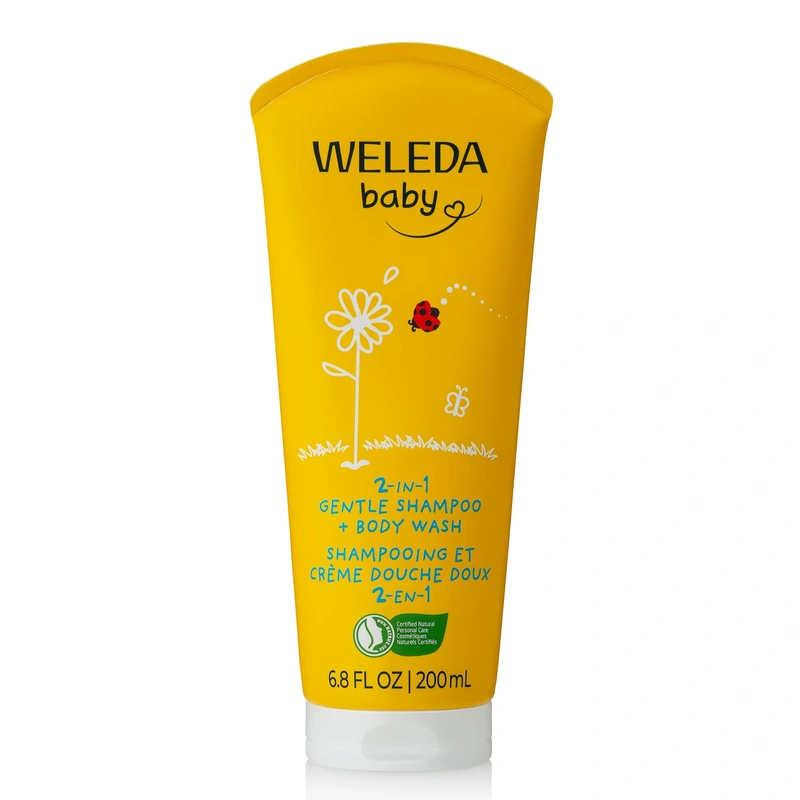
Here’s what that looks like in practice: an on-white photo we shot for Weleda, with a clean white background and the tube filling nearly the full height of the frame.
What Amazon Requires Beyond the Main Image
Amazon’s minimum technical requirement is one image per listing. Its actual recommendation is a lot more than that: at least six images, with room for up to nine.
Amazon’s own announcement to sellers says every product page needs at least three required images: one white-background shot (the main image), one in-context or lifestyle image showing the product in use, and one product-information image communicating dimensions, materials, or specs (Amazon Seller Central announcement, retrieved 2026-09-20).
Those three images matter for another reason. Amazon has told sellers it prioritizes the brand owner’s images and only uses other sellers’ images when required ones are missing from a product page (Amazon Seller Central announcement). Amazon’s announcements describe this for hardlines products first, with softlines and consumables to follow, and say that when required images are missing, images from other selling partners or from Amazon can be added. A complete set of your own images leaves nothing for Amazon to fill in.
Secondary images get more creative freedom than the main image does. This is where lifestyle photography, infographics, and comparison shots live:
- Lifestyle images show the product in a real setting, in use, in someone’s hands, or styled with complementary props. These are the images that help a shopper picture owning or using the product, not just identifying it.
- Infographic-style images combine a photo with short text callouts: dimensions, key features, what’s included in the box. These only belong in secondary images. Amazon prohibits marketing text and callouts on the main image itself.
- Scale and size-reference images answer a question most listings skip. In Baymard Institute’s 2017 usability research, 42% of users tried to gauge a product’s size from its images, and 28% of the 60 largest ecommerce sites it benchmarked offered no in-scale image at all, meaning one showing the product against a hand, a coin, or another familiar object (Baymard Institute). That’s an easy gap to close and an easy one to miss.
- Multiple angles matter more for products with texture, movement, or dimensional detail: fabric, hardware, anything with moving parts or alternate sides worth seeing.
A shot list built before the shoot, not improvised during it, is what catches all of this in one session instead of a second round of reshoots. That’s the same planning process we walk through in what a real commercial photography brief looks like.
A+ Content Image Rules, If You’re Brand Registered
If you’re enrolled in Brand Registry, A+ Content lets you replace the plain bullet-point description with a richer, modular page: comparison charts, lifestyle banners, brand story sections. It’s worth the setup: Amazon says Basic A+ Content can increase sales by up to 8%, and Premium A+ Content by up to 20% (Amazon, retrieved 2026-09-20).
A+ modules carry their own image standards, separate from the main and secondary product images:
- At least 72 DPI resolution on every module image, which is the minimum Amazon lists (Amazon Seller Central, retrieved 2026-09-20). A+ modules often display larger than a standard product photo, so shoot well above the minimum.
- Consistent aspect ratios across modules. A page that alternates between oddly cropped and full-bleed images reads as unfinished, even if every individual image is technically fine.
A+ Content is a separate project from your core product images, but it draws on the same source photography. Planning both at once, rather than shooting product images first and scrambling for A+ assets later, is the difference between one efficient session and two.
Why Images Get Rejected, or Listings Suppressed
Most rejected images fail for one of a handful of repeat reasons, and nearly all of them trace back to the main image spec:
Your background isn’t actually pure white. Warm or cool-toned studio lighting can produce a background that looks white to the eye but measures off from RGB 255, 255, 255. This is the single most common cause of main image non-compliance, and it’s a lighting and color-calibration problem, not a Photoshop problem you can fully fix after the fact.
Product occupies less than 85% of the frame. Too much white space around the product, often from a wide safety crop, is an easy miss and an easy flag.
Resolution too low for zoom. Images under roughly 1,000 to 1,600 pixels on the long side either lose the zoom feature or look soft when a shopper tries to use it.
Text, watermarks, or promotional language on the main image. No “Free Shipping” badges, no percent-off callouts, no brand taglines layered onto the photo itself. That content belongs in secondary images or A+ Content, never the main image.
Showing props or accessories not included in the purchase. A styled shot with extra items in frame is fine as a secondary lifestyle image, but Amazon will flag it as the main image if it misrepresents what’s actually in the box.
Any one of these can trigger suppression: the listing drops out of search results until it’s fixed, which means lost visibility during exactly the window when a new listing needs it most.
New for 2026: AI-Generated Images
Two AI-related points are worth knowing about if you haven’t touched your Amazon images in the past year.
Amazon now allows AI-assisted editing, within limits. Sellers can use AI tools to enhance or edit product photos, but the final image still has to accurately represent the physical product. An AI-generated render that doesn’t correspond to an actual photograph of the actual item isn’t compliant, regardless of how polished it looks. For now, it’s best to treat “AI-enhanced” as meaning color correction and cleanup on a real photo, not a substitute for one.
Amazon now wants AI-generated people tagged. In July 2026, Amazon told sellers to add the metadata keyword contains-synthetic-performer to listing images and A+ Content that show photorealistic people created entirely by AI. It does not apply to real people edited with AI, or to images without people. The notice followed a New York disclosure law that took effect June 9, 2026 (eWeek).
Both points lead the same way: Amazon wants listing images to show the real product accurately.
DIY vs. Hiring a Photographer for Amazon-Compliant Images
A phone and a lightbox can produce one usable white-background shot for one or two SKUs. Where DIY starts to break down is consistency at scale: matching the same true white, the same shadow treatment, and the same product framing across 20, 50, or 200 SKUs, without a calibrated lighting setup and a repeatable workflow.
That consistency is exactly what a professional studio session is built to deliver, and it’s the same argument we lay out in full in DIY vs. professional ecommerce photography: what changes, what it costs, and where each approach actually makes sense. A half-day studio session typically covers 5 to 15 products, fully lit, shot to spec, and retouched in a single sitting. For a growing catalog, our cost calculator gives you a real number to weigh against the time DIY actually takes once you factor in reshoots. And you don’t need to be in Chicago: Amazon catalog work is a natural fit for shipping your products to our studio.
Frequently Asked Questions
Can my main image have an off-white or light gray background instead of pure white?
No. Amazon’s spec is RGB 255, 255, 255, and off-white or light gray backgrounds are one of the most common reasons main images get flagged. If your product itself is white and the background needs to read as distinctly separate, controlled studio lighting and a slight rim light or shadow line, not a gray background, is the fix.
How many images does my Amazon listing actually need?
One is the technical minimum, but Amazon recommends at least six and allows up to nine. A practical baseline covers a compliant white-background main image, one or two lifestyle images, an infographic with key specs or dimensions, a scale-reference shot, and any additional angles the product needs.
Can I use AI-generated product photos on Amazon?
AI-assisted editing and enhancement of real product photos is allowed, as long as the final image accurately represents the physical product. A fully AI-generated image that doesn’t correspond to an actual photograph isn’t compliant. In July 2026, Amazon also told sellers to tag photorealistic AI-generated people in listing images.
What actually happens if my images don’t meet Amazon’s requirements?
Non-compliant images can be rejected outright, or the listing can be suppressed from search results until the issue is fixed. If a product page is also missing required images, Amazon says it can fill the gap with photos from other sellers, though it prioritizes the brand owner’s own images.
Getting It Right the First Time
Amazon’s image requirements aren’t complicated to read. They’re just unforgiving to get slightly wrong. A pure white main image, a complete set of secondary shots, and A+ Content built on the same source photography cover what Amazon actually checks for, plus what actually helps a shopper decide.
If you’re planning a shoot for a new listing or a catalog refresh, our guide to building a commercial photography brief walks through how to plan the full shot list, Amazon-spec and beyond, before the shoot day instead of during it. Get in touch to talk through what your catalog needs.